Book 1 · out soon

Book Title

Subtitle goes here.

Kindle 335 pages

Coming next

+

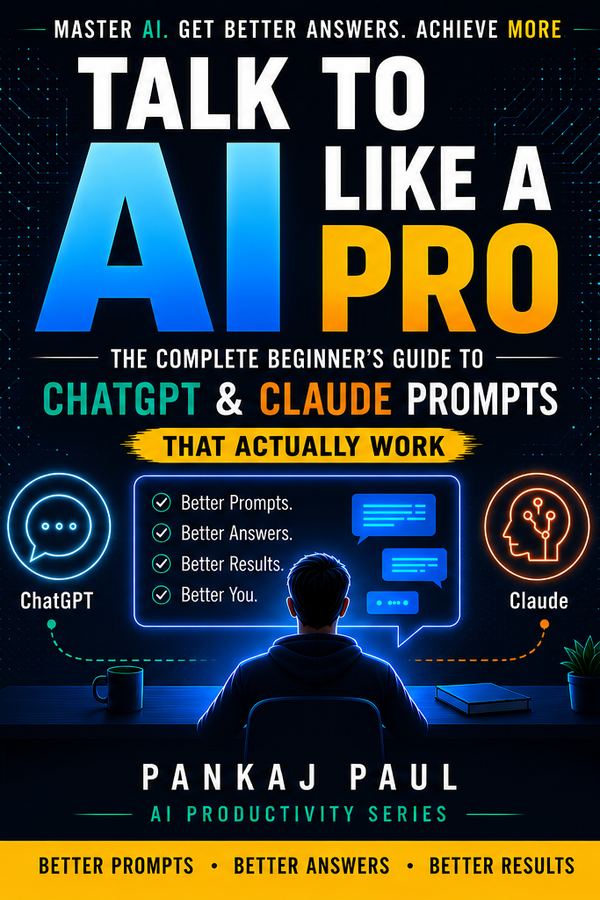
Front cover of Talk to AI Like a Pro by Pankaj Paul
In the book
14
Chapters
10
Costly mistakes
8
Case studies
4
AI tools compared
Free on this site
100
Prompts
20
Templates
The whole idea, in one screen

Same tool. Different instructions.

Most people don't get bad results from AI because the tool is weak. They get bad results because of what they typed. The book teaches the difference.

What most people type
write an email to my boss for leave
the upgrade
What the book teaches you to type
You are a polite, professional assistant.
Write a 3-line leave email to my manager
for 2 days off next week (family function).
Tone: warm but formal. Offer to hand over work.
Inside the book

What you'll walk away knowing

Short chapters, plain steps, and prompts you can copy straight into any AI tool.

The fundamentals of AI prompting

What a prompt actually is, why some work and most don't, and the habits that separate a useful answer from a vague one.

The CLEAR prompt framework

A repeatable structure you can apply to any request, in any tool, without memorising a script.

ChatGPT and Claude, side by side

The two tools answer differently. Learn where each one is stronger and which to reach for — plus a fuller comparison including Gemini and DeepSeek.

Prompts for real work

Writing, study, business and productivity — the categories most people actually need, with worked examples.

Common mistakes, and the fixes

The traps beginners fall into — and the small change that avoids each one.

Examples you can use today

Real prompts you can copy straight out of the book and run before you finish the chapter.

Who it's for

Written for people who don't have time to become experts.

No coding, no jargon, no assumption that you already know the basics.

Students Professionals Entrepreneurs Content creators Anyone who wants to use AI confidently

For readers of the book

Chapter 12 gives you 100 prompts. The library here gives you 100 more — different ones, free, no sign-up. Plus 20 templates and The AI Edge newsletter.

Readers

What readers are saying

Free, live now

Start before you buy anything.

Two things on this site are free and working today. Use them, and you'll know within ten minutes whether the book is for you.

Prompt library

Tested prompts sorted by the job you're doing — email, work, study, marketing, writing, personal, money. Fill in the blanks and paste.

Open the prompt library

Templates

Multi-step workflows that run a whole project, plus document skeletons you copy into Docs, Sheets or Word.

Open the templates
Start here

Get Book 1.

You're one prompt away from the rest of the journey.

The series

One journey from first prompt to fluent.

Book 1 is your entry point. The rest roll out from there.

01

Book Title

The foundation — how to actually communicate with AI and get useful results, even if you're starting today.

Launching
02

Book 2

Description for the second book in the series.

Coming
···

More books in the works

Titles announced as they're ready.

Planned
Front cover of Talk to AI Like a Pro by Pankaj Paul
Book 1 · start here

Book Title

It fixes the one thing that stops most beginners: knowing what to say to AI. Learn the method, and the rest of the series opens up.

Readers

What readers are saying

Courses

Courses that turn reading into doing.

In development. Here's the shape of the first one.

In development

Guided, on-screen courses where you watch, follow along, and build real AI workflows step by step — the same ideas as the books, but hands-on. Made for Indian professionals, students and small businesses.

  • Short video lessons you can finish in one sitting
  • Real projects: emails, resumes, business ops, study systems
  • Downloadable prompts and templates with every module
  • Certificate of completion
Teaser video · not filmed yet
The first course

Book 1, on screen

The same method, project by project. Outline is provisional.

Planned outline · 6 modules
Talk to AI, in practice
01
Your first real prompt
8 min
02
The 5-part formula, applied
12 min
03
Emails & documents that write themselves
15 min
04
Build your own prompt library
10 min
05
Templates & workflows for real projects
14 min
06
Your 30-minute AI productivity system
12 min
Workshops

Live workshops — learn AI by doing, together.

Planned. Small, hands-on sessions where you build real things in real time.

Planned

Not lectures. Small, hands-on sessions where you build real AI workflows live, get unstuck on the spot, and leave with something finished. Made for Indian professionals, students and small teams.

  • Live, interactive sessions — follow along in real time
  • Small groups, so your questions actually get answered
  • Build real things: your workflows, your projects
  • Recording, workbook and prompts to keep
Planned format
Prompting for real work
1
Warm-up — your goals & tools
10 min
2
Build — 3 workflows, live with you
50 min
3
Q&A — your real problems
30 min
90 min · small group
How they'll work

Small, live, and hands-on

Live & interactive

Real-time sessions where you follow along, share your screen if you like, and get unstuck on the spot.

Small groups

Capped numbers, so everyone gets attention and every question gets a real answer.

Recording & workbook

Can't make it live? Get the recording, a workbook, and every prompt used in the session.

Prompt library

Prompts that just work — copy, paste, done.

A free starter pack. Search, filter, copy. No signup.

Free starter pack

Pick one, fill in the blanks, paste it in.

Organised by category, sub-topic and tag. Works in ChatGPT, Claude or Gemini. Anything in {curly braces} is yours to replace.

AI Tools Comparison

ChatGPT vs Claude vs Gemini vs DeepSeek.

Current pricing, what each one is actually good at, and an honest verdict on all four. Free, no sign-up.

At a glance

What each one can and cannot do.

Book 1 deliberately prints no prices, message caps or model names — those change every few weeks and would date the book before it reached you. They live here instead.

Feature comparison of ChatGPT, Claude, Gemini and DeepSeek
Honest verdicts

The case for each one.

All four are good. These are the differences that actually change which one you should open.

Current models

What each tool is running right now.

Version numbers change every few weeks. Do not memorise them — notice the shape instead: each maker keeps a fast everyday model and a slower, stronger one.

Templates

Done-for-you assets you can deploy today.

Two kinds: workflows that run a project, and documents you fill in. Free, no signup.

Free starter pack

Two kinds: workflows and documents.

Workflows run a whole project step by step. Document skeletons drop straight into Docs, Sheets or Word. Fill in the {blanks} and go.

Free sample

The CLEAR Formula.

Five pages from chapter 4 — the system the whole book is built on. Free.

From the book

What if you had a single formula you could use for every situation — writing emails, planning meals, preparing for interviews, creating content — that guaranteed a great response from AI every time? That formula exists. It is called CLEAR. And once you learn it, you will never struggle with prompting again.

Introducing the CLEAR Formula

In Chapter 2, you learned the five golden ingredients of a great prompt: Role, Context, Task, Format, and Tone. The CLEAR Formula takes these ingredients and turns them into a simple, memorable system you can apply instantly — whether you are asking AI to write a business proposal or plan a birthday dinner.

CLEAR stands for:

LetterStands forThe question to ask
CContextWho am I? What is my situation?
LLength & FormatHow long? What shape should the answer take?
EExamplesCan I show the AI what good looks like?
AActionWhat exactly do I want the AI to do?
RRoleWho should the AI pretend to be?

You do not need to use every element in every prompt. Think of CLEAR as a toolkit — pull out the tools that the task actually needs. For a simple question, C and A alone may be enough. For a complex creative or professional task, all five elements together will produce outstanding results.

Breaking Down Each Element

C

Context — set the scene

Context tells the AI who you are, what your situation is, and why you need help. Without context, the AI has to make assumptions — and those assumptions are often wrong. With context, the AI can personalise its response directly for you.

Ask yourself: Who am I? What is my background? What situation am I in? What do I already know?

Example: "I am a first-time homebuyer in Bengaluru with a budget of ₹60 lakhs…"

Compare these two prompts:

No context

Help me write a complaint letter.

With context

I am a customer who received a damaged product from an online furniture store. I want a refund but they are not responding. Help me write a firm but polite complaint letter.

The second prompt will produce a letter you can actually copy and send. The first will produce a generic template that needs heavy editing.

L

Length & Format — shape the answer

Format tells the AI how to package its response. Should it write a paragraph or a bullet list? A table or a step-by-step guide? A 50-word summary or a 500-word essay? Without a format instruction, the AI will guess — and it often writes far more (or less) than you need.

Ask yourself: How long should the response be? What structure do I want — list, table, paragraph, steps?

Example: "Present this as a numbered list of 5 tips, each under 3 sentences."

Useful format instructions you can drop into any prompt:

  • "In bullet points"
  • "As a table with two columns: Pros and Cons"
  • "In under 100 words"
  • "Step-by-step, numbered"
  • "As a short paragraph, no more than 5 sentences"
  • "Write it like a professional email with a subject line"
E

Examples — show, don't just tell

Giving the AI an example of what good output looks like is one of the most powerful prompting techniques available. Examples set the tone, style, structure, and quality bar instantly — better than any description ever could. Even one short example transforms the result.

Ask yourself: Can I show the AI a sample of the style, tone, or format I want?

Example: "Write in a tone similar to this: 'Our product does not just save you time — it gives you back your life.'"

  1. Tone example: Paste in a short example of writing you like and say "match this tone".
  2. Style description: Describe the style: "Write like a friendly teacher explaining to a 12-year-old."
  3. Before & after: Show a before and after: "Here is a weak version: [X]. Rewrite it to be stronger."
You do not need a perfect example — even a rough one helps. The AI is very good at picking up on patterns from just one or two sentences.
A

Action — state exactly what you want

The Action is the most critical part of any prompt. It is the verb — the specific thing you are asking the AI to do. Many beginners are vague here, writing "help me with" or "tell me about" when what they really mean is "write", "summarise", "create", "explain", "translate", "compare", or "list".

Ask yourself: What is the ONE specific thing I want the AI to produce right now?

Example: "Write a 3-paragraph email." / "List 10 ideas." / "Summarise this in 5 bullet points."

Strong action words to use in your prompts:

WriteSummariseExplainTranslate CreateListCompareSimplify DraftRewriteAnalyseSuggest DesignImproveGenerateCritique
R

Role — give the AI a persona

Assigning a role is like putting a specialist hat on the AI. When you ask Claude or ChatGPT to "act as" someone, it adjusts its vocabulary, depth, perspective, and tone to match that role. A doctor explains differently from a teacher. A marketer writes differently from a lawyer. The role unlocks a specialist mode.

Ask yourself: Who is the best person to answer this — a doctor, a teacher, a coach, a lawyer, a chef?

Example: "Act as an experienced yoga instructor helping a 50-year-old beginner…"

The role does not have to be a profession. It can be:

  • A personality: "Act as a brutally honest critic"
  • A character: "Respond like a wise grandparent"
  • A level: "Explain this as if I am a complete beginner"
  • A mix: "You are a friendly financial advisor who specialises in helping young salaried professionals in India"

The CLEAR Formula in Action — A Complete Example

Now let us put all five elements together. Here is a real-world scenario: someone in Pune wants help preparing for a job interview.

Here is their prompt, broken down by CLEAR element:

R Role
You are an experienced career coach who specialises in helping people change industries.
C Context
I am a 29-year-old software tester in Pune with 5 years of experience. I want to move into product management but have no formal PM experience.
A Action
Write a LinkedIn summary for me that highlights my testing background as an advantage for a PM role.
L Length & Format
Keep it under 200 words. Use short paragraphs, not bullet points.
E Example
Tone should be confident but not arrogant — similar to: "I bring a unique lens to product development, shaped by years of breaking things before they reach users."

This single prompt, built with the CLEAR formula, will produce a LinkedIn summary that is specific, compelling, and usable within seconds. No endless back-and-forth. No generic output. Just a result you can actually use.

Read the other four elements

Enter your email and the rest of the excerpt opens right here — Length, Examples, Action and Role, plus the full worked example. You'll also get the newsletter.

Free. One or two emails a month. Unsubscribe anytime.

That didn't go through. Check your connection and try again.

About

The person behind the series.

Why this exists, and who's building it.

Pankaj Paul, author of the AI Productivity Series
The author

Hi, I'm the author.

I write for the person who feels one step behind — I've been that person plenty of times. By day I build free tools at Simply Wealth Creation that help everyday Indians make sense of their money, and this series comes from the same instinct: take something intimidating and make it feel obvious. Expect plain language, examples from our world, and no pretending you already know the basics.

I started the AI Productivity Series because I kept watching capable people get intimidated by AI — not because it's hard, but because no one explained it in plain terms. This is the guide I wish they'd had.

Get in touch

Questions, corrections, or you spotted something wrong in the book — I read everything.

hello@aiproductivityseries.com
LinkedIn

The newsletter

The AI Edge.

Practical AI tips for Indian readers — new techniques, prompts worth trying, and honest tool reviews. Sent when the tools actually change, not on a schedule. Free.

Free. One or two emails a month. Unsubscribe anytime.

You're subscribed. Check your inbox to confirm.

That didn't go through. Try again in a moment.

Signups open shortly — do check back.